
To appreciate C one must learn assembly; to appreciate Python one must learn C. They all stack on top of each other (Assembly -> C -> Python -> English (now))
Python has many implementations (PyPy, Jython, etc.), but the original and most popular is CPython.
getting started with CPython source code
Clone it:
$ git clone https://github.com/python/cpython
$ cd cpython
$ git checkout v3.8.0b4  # or whatever version you prefer
What's inside:
cpython/
│
├── Doc      ← Source for the documentation
├── Grammar  ← The computer-readable language definition
├── Include  ← The C header files
├── Lib      ← Standard library modules written in Python
├── Mac      ← macOS support files
├── Misc     ← Miscellaneous files
├── Modules  ← Standard Library Modules written in C
├── Objects  ← Core types and the object model
├── Parser   ← The Python parser source code
├── PC       ← Windows build support files
├── PCbuild  ← Windows build support files for older Windows versions
├── Programs ← Source code for the python executable and other binaries
├── Python   ← The CPython interpreter source code
└── Tools    ← Standalone tools useful for building or extending Python
After forking and cloning, I broke things down into:
- Finding the entry point (the main function) of Python
- Locating where specific functions are implemented
- Editing those functions
- Remaking grammar files/source files and running the modified Python
table of contents
- The Walrus Operator
- String Optimization
- Chained Comparison Operators
- Integer Optimization
- How Python's id() Works
- Adding a New Statement to Python
- Function Overloading in Python
- Parser and Tokenization
- Visualizing Abstract Syntax Trees
- Pointers in Python
- The Print Function Internals
- Python is slow as hell
- Python Execution Process
- The GIL
the walrus operator
Python 3.8 added the Walrus Operator (:=). It assigns and returns in one shot.
Say you're building a tiny shell that takes commands until you type exit:
Without walrus:
command = input("$ ")
while command != "exit":
    os.system(command)
    command = input("$ ")
With walrus:
while (command := input("$ ")) != "exit":
    os.system(command)
what's weird about the walrus operator
But nope - not without parentheses:
>>> a := 10
  File "<stdin>", line 1
    a := 10
      ^
SyntaxError: invalid syntax
But wrap it in parentheses and it's fine:
>>> (a := 10)
10
This is documented in wtf-python. Python disallows non-parenthesized assignment expressions but allows non-parenthesized assignment statements. Annoying.
modifying Python's grammar
But we can fix that. Just modify the grammar:
# Add walrus operator here so we don't need () every time
expr_stmt: testlist_star_expr (annassign | augassign (yield_expr|testlist) |
                   [('=' (yield_expr|testlist_star_expr))+ [TYPE_COMMENT]] |
                   [(':=' (yield_expr|testlist_star_expr))+ [TYPE_COMMENT]]
                   )
The grammar file isn't used directly by the compiler. A parser table generated by pgen is what actually matters. So after changing the grammar, you run make regen-pgen and make to rebuild. Now it works:
>>> a := 10
>>> a
10
string optimization
Python does something clever with strings called String Interning:
>>> a = 'samit'
>>> b = 'samit'
>>> a == b
True
>>> id(a)
4337581920  # memory location
>>> id(b)
4337581920  # same memory location
Both variables point to the same memory location.
string interning
The idea is simple: don't create a new copy of a string every time. Keep one copy of each distinct string and use pointer references everywhere else.
You can check if two objects are the same in-memory object with is:
>>> 'python' is 'python'
True
how does it work
Here's the actual C code:
void PyUnicode_InternInPlace(PyObject **p)
{
    PyObject *s = *p;
    PyObject *t;
    // Check if already cached, return that
    if (PyUnicode_CHECK_INTERNED(s))
        return;
    if (interned == NULL) {
        interned = PyDict_New();  // create global mapping like a cache
        if (interned == NULL) {
            PyErr_Clear();
            return;
        }
    }
    // STRING INTERNING KEY -> we aren't really storing strings but rather pointers
    t = PyDict_SetDefault(interned, s, s);
    if (t == NULL) {
        PyErr_Clear();
        return;
    }

    if (t != s) {
        Py_INCREF(t);  // increases reference (more objects pointing to it)
        Py_SETREF(*p, t);  // sets *p = t so new p string points to instance of t
        return;
    }
    Py_REFCNT(s) -= 2;
    _PyUnicode_STATE(s).interned = SSTATE_INTERNED_MORTAL;
}
I added a print statement to the C code and you can literally watch interning happen:
>>> a = 'samit'
Already interned: __doc__
Already interned: __annotations__
Already interned: top
Interning: <module>
Interning: samit
Already interned: stderr
Already interned: flush
Already interned: flush
Already interned: stdout

>>> b = 'samit'
Already interned: samit  # already interned
chained comparison operators
Python lets you chain comparisons. a < b < c actually means (a < b) and (b < c). Like how math notation works.
>>> -3 < -2 < -1
True
>>> 3 > 2 == 1
False
In C, the same expressions give opposite results:
#include <stdio.h>

int main(int argc, char *argv[]) {
    printf("%d\n", -3 < -2 < -1);
    printf("%d\n", 3 > 2 == 1);
    return 0;
}

// Output:
// 0  // false
// 1  // true
C evaluates -3 < -2 < -1 as ((-3 < -2) < -1) because of left-to-right associativity. Classic C gotcha.
how Python implements comparison chaining
Looking at the bytecode with dis:
dis.dis("1 < 2 < 3")
  0           RESUME                   0

  1           LOAD_CONST               0 (1)
              LOAD_CONST               1 (2)
              SWAP                     2
              COPY                     2
              COMPARE_OP               2 (<)
              COPY                     1
              TO_BOOL
              POP_JUMP_IF_FALSE        5 (to L1)
              POP_TOP
              LOAD_CONST               2 (3)
              COMPARE_OP               2 (<)
              RETURN_VALUE
      L1:     SWAP                     2
              POP_TOP
              RETURN_VALUE
Python short-circuits here: once it knows 1 < 2, it checks 2 < 3. C would just evaluate (1 < 2) < 3 which is completely different.
integer optimization
Python preallocates integers from -5 to 256. Any time you use a number in that range, you get the same object back instead of a new one.
Check it:
>>> x, y = 36, 36
>>> id(x) == id(y)
True

>>> x, y = 257, 257
>>> id(x) == id(y)
False
Here's the C code:
static PyObject *
get_small_int(sdigit ival)
{
    PyObject *v;
    assert(-NSMALLNEGINTS <= ival && ival < NSMALLPOSINTS);  // NSMALLNEGINTS = 5, NSMALLPOSINTS = 257
    v = (PyObject *)&small_ints[ival + NSMALLNEGINTS];
    Py_INCREF(v);
    return v;  // return the preallocated integer instance
}
peephole optimizations
CPython also does "peephole optimizations" which lead to some weird behavior:
>>> x = 1000
>>> y = 1000
>>> x is y
False  # In REPL

# But in a file this would return True
CPython preloads:
- Integers between
-5and256 - Strings under 20 characters that only contain ASCII letters, digits, and underscores
>>> s1 = "realpython"
>>> s2 = "realpython"
>>> s1 is s2
True

>>> s1 = "Real Python!"  # Contains non-alphanumeric characters
>>> s2 = "Real Python!"
>>> s1 is s2
False
how Python's id() works
id() just returns the memory address of an object. Here it is in bltinmodule.c:
static PyObject *
builtin_id(PyModuleDef *self, PyObject *v)
{
    PyObject *id = PyLong_FromVoidPtr(v);  // stores argument as a memory location in id

    if (id && PySys_Audit("builtins.id", "O", id) < 0) {
        Py_DECREF(id);
        return NULL;
    }

    return id;
}
PyLong_FromVoidPtr(v) converts a pointer to a Python long integer:
PyLong_FromVoidPtr(void *p)
{
    return PyLong_FromUnsignedLong((unsigned long)(uintptr_t)p);
}
the 'is' operator
is checks if two objects point to the same memory location:
>>> a = 10
>>> b = 10
>>> a is b
True
>>> id(a)
4343226816
>>> id(b)
4343226816
In bytecode it's the IS_OP instruction:
>>> import dis
>>> dis.dis("a is b")
  0           RESUME                   0

  1           LOAD_NAME                0 (a)
              LOAD_NAME                1 (b)
              IS_OP                    0
              RETURN_VALUE
The actual implementation in ceval.c:
case TARGET(IS_OP): {
    PyObject *right = POP();
    PyObject *left = TOP();

    // Check if two pointers are the same
    int res = Py_Is(left, right) ^ oparg;

    // Set the result on top of stack
    PyObject *b = res ? Py_True : Py_False;
    Py_INCREF(b);
    SET_TOP(b);
    Py_DECREF(left);
    Py_DECREF(right);
    DISPATCH();
}
oparg is how it handles both is and is not:
>>> dis.dis("a is not b")
  0           RESUME                   0

  1           LOAD_NAME                0 (a)
              LOAD_NAME                1 (b)
              IS_OP                    1
              RETURN_VALUE
adding a new statement to Python
Python's main function looks different depending on your OS:
/* Minimal main program -- everything is loaded from the library */

#include "Python.h"

#ifdef MS_WINDOWS
int
wmain(int argc, wchar_t **argv)
{
    return Py_Main(argc, argv);
}
#else
int
main(int argc, char **argv)
{
    return Py_BytesMain(argc, argv);
}
#endif
I added a new statement called nuke that just kills the runtime with exit code 45:
    | 'break' { _PyAST_Break(EXTRA) }
    | 'continue' { _PyAST_Continue(EXTRA) }
    | 'nuke' { _PyAST_nuke(EXTRA) }
// in python.gram

// in compile.c

    case Break_kind:
        return compiler_break(c);
    case Continue_kind:
        return compiler_continue(c);
    case Nuke_kind:
        return compiler_nuke(c);

static int
compiler_nuke(struct compiler *c)
{
    exit(45);  // implementation
}
Run make regen-pegen (Python 3.10+ uses pegen, earlier versions used pgen) then make, and we've got a new keyword:
>>> nuke
[Program exits with code 45]
function overloading in Python
Python doesn't do function overloading like C++:
// C++ supports function overloading (C does not)
int area(int len, int breadth) { return len * breadth; }
float area(int radius) { return 3.14 * radius * radius; }

// area(3,4) calls the first function, area(3) calls the second
In Python, defining a function with the same name just overwrites the previous one:
def area(length, breadth): return length * breadth
locals()
# {'area': <function area at 0x104d1b420>}

def area(radius):
    return radius * radius * 3.14
locals()
# {'area': <function area at 0x104d1b2e0>}

print(area(4))  # 50.24
print(area(3,4))  # TypeError: area() takes 1 positional argument but 2 were given
implementing function overloading
You can fake it with decorators though:
from inspect import getfullargspec
from functools import wraps

class OverloadRegistry:
    """ Singleton class to hold overloaded functions """
    _instance = None  # private
    def __init__(self) -> None:
        if OverloadRegistry._instance is not None: raise Exception("Use get_instance() to get singleton instance")
        self.registry = {}
        OverloadRegistry._instance = self

    @classmethod
    def get_instance(cls):
        if cls._instance is None: cls._instance = OverloadRegistry()
        return cls._instance

    def _make_key(self, fn, args=None):
        if args is None: args = getfullargspec(fn).args
        return (fn.__module__, fn.__name__, len(args))  # key = {module, name, number of arguments}

    def register(self, fn):
        key = self._make_key(fn)
        self.registry[key] = fn  # attach this key to function

        @wraps(fn)
        def wrapper(*args, **kwargs):
            """ The @wraps decorator preserves metadata of the original function """
            match_key = (fn.__module__, fn.__name__, len(args))
            target_fn = self.registry.get(match_key)
            if not target_fn: raise TypeError("No matching function of this type")
            return target_fn(*args, **kwargs)
        return wrapper

def overload(fn):
    return OverloadRegistry.get_instance().register(fn)

@overload
def area(l, b): return l * b

@overload
def area(r): return r * r * 3.14

print(area(5,6))  # 30
print(area(3))    # 28.26
Python 3.4+ also has functools.singledispatch which dispatches based on type:
from functools import singledispatch

@singledispatch
def area(shape):
    raise TypeError("Unsupported type")

@area.register
def _(dimensions: tuple):
    l, b = dimensions
    return l * b

@area.register
def _(radius: int):
    return 3.14 * radius * radius

print(area((5,6)))  # 30
print(area(3))      # 28.26
And 3.8+ has singledispatchmethod for class methods:
from functools import singledispatchmethod
class AreaCalc:
    @singledispatchmethod
    def area(self, shape):
        raise TypeError("Unsupported Type")

    @area.register
    def _(self, dimensions: tuple):
        l, b = dimensions
        return l * b

    @area.register
    def _(self, radius: int):
        return 3.14 * radius * radius

calc = AreaCalc()
print(calc.area((5,6)))  # 30
print(calc.area(3))      # 28.26
parser and tokenization
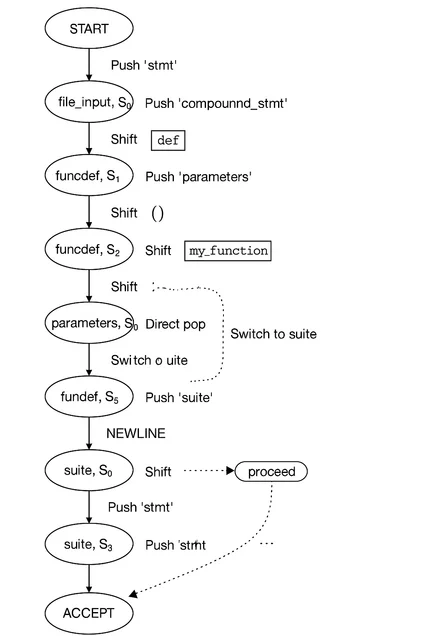
Python's parser uses Deterministic Finite Automata (DFA) to process tokens. Here it is in action:
$ ./python.exe -d test_tokens.py

Token NAME/'def' ... It's a keyword
 DFA 'file_input', state 0: Push 'stmt'
 DFA 'stmt', state 0: Push 'compound_stmt'
 DFA 'compound_stmt', state 0: Push 'funcdef'
 DFA 'funcdef', state 0: Shift.
Token NAME/'my_function' ... It's a token we know
 DFA 'funcdef', state 1: Shift.
Token LPAR/'(' ... It's a token we know
...
DFA visualisation:
visualizing abstract syntax trees
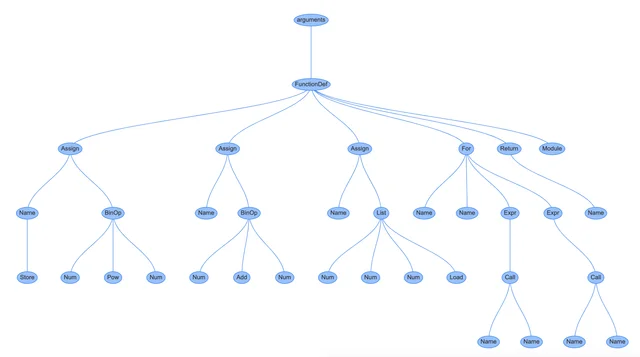
CPython converts your code into an Abstract Syntax Tree (AST). You can visualize this with instaviz:
import instaviz

def main():
    a = 2 * 2 * 2 * 2
    b = 1 + 5
    c = [1, 4, 6]
    for i in c:
        print(i)
    else:
        print(a)
    return c

instaviz.show(main)
Here's the AST showing all loops/conditional statements:
The compiler then turns this AST into something the CPU can work with:
- Create a control-flow-graph representing execution order
- Convert CFG nodes into bytecode
pointers in Python
Python doesn't expose pointers to you, but they're everywhere in CPython's internals. Every Python object is a PyObject* in C - a pointer to a struct with a reference count and a type pointer. When you do a = b in Python, you're copying a pointer, not the object. Py_INCREF bumps the reference count when a new reference is created; Py_DECREF drops it and frees the object when it hits zero. You saw this already in the string interning code above - that Py_INCREF(t) and Py_SETREF(*p, t) pattern is the actual mechanism behind every Python assignment. The reason del x doesn't necessarily free memory is that Py_DECREF only frees when the count reaches zero, and something else may still be holding a reference.
the print function internals
Here's print() in CPython:
static PyObject *
builtin_print(PyObject *self, PyObject *const *args, Py_ssize_t nargs, PyObject *kwnames)
{
    // If no file specified, use stdout
    if (file == NULL || file == Py_None) {
        file = _PySys_GetObjectId(&PyId_stdout);
        // ...
    }

    // Print each argument with separator
    for (i = 0; i < nargs; i++) {
        if (i > 0) {
            if (sep == NULL)
                err = PyFile_WriteString(" ", file);
            else
                err = PyFile_WriteObject(sep, file, Py_PRINT_RAW);
            if (err)
                return NULL;
        }
        err = PyFile_WriteObject(args[i], file, Py_PRINT_RAW);
        if (err)
            return NULL;
    }

    // Print end character (default: newline)
    if (end == NULL)
        err = PyFile_WriteString("\n", file);
    else
        err = PyFile_WriteObject(end, file, Py_PRINT_RAW);

    Py_RETURN_NONE;
}
So when you call print("hello world!"):
"hello world"becomes aPyUnicodeObjectbuiltin_print()runs with 1 argumentfilegets set tostdout- The argument gets written to
file - A
\ngets written tofile
Python is slow as hell
I wrote the same BST in both Python and C++ to compare:
"""
BST Structure
     5
    / \
   3   7
  /     \
 1       9
"""

import time
import random
class Node:
    def __init__(self, data) -> None:
        self.left = None
        self.right = None
        self.data = data

class BST:
    def __init__(self) -> None:
        self.root = None

    def insert(self, data):
        if self.root is None: self.root = Node(data)
        else:
            self._insert(data, self.root)

    def _insert(self, data, currNode):
        if data < currNode.data:
            # left tree
            if currNode.left is None: currNode.left = Node(data)
            else:
                self._insert(data, currNode.left)
        elif data > currNode.data:
            if currNode.right is None: currNode.right = Node(data)
            else:
                self._insert(data, currNode.right)
        else:
            print("Value already in tree")

def inorder(node): # L N R
    if node:
        inorder(node.left)
        print(node.data)
        inorder(node.right)


def run_python_benchmark():
    nums = random.sample(range(1, 100000), 10000)  # 10,000 unique numbers
    tree = BST()
    start = time.time()
    for num in nums:
        tree.insert(num)
    end = time.time()
    print(f"Python BST insert time: {end - start:.6f} seconds")

run_python_benchmark()#include <iostream>
#include <chrono>
#include <vector>
#include <algorithm>
#include <random>
using namespace std;
using namespace std::chrono;
class Node
{
public:
int data;
Node *left;
Node *right;
Node(int val)
{
data = val;
left = right = nullptr;
}
};
class BST
{
public:
Node *root;
BST()
{
root = nullptr;
}
void insert(int data)
{
if (!root)
root = new Node(data);
else
insertHelper(data, root);
}
private:
void insertHelper(int data, Node *currNode)
{
if (data < currNode->data)
{
if (!currNode->left)
currNode->left = new Node(data);
else
insertHelper(data, currNode->left);
}
else if (data > currNode->data)
{
if (!currNode->right)
currNode->right = new Node(data);
else
insertHelper(data, currNode->right);
}
}
};
int main()
{
vector<int> nums(10000);
iota(nums.begin(), nums.end(), 1);
shuffle(nums.begin(), nums.end(), mt19937(random_device{}()));
BST tree;
auto start = high_resolution_clock::now();
for (int n : nums)
tree.insert(n);
auto end = high_resolution_clock::now();
duration<double> elapsed = end - start;
cout << "C++ BST insert time: " << elapsed.count() << " seconds" << endl;
return 0;
}performance comparison
| Language | Average Time (per run) |
|---|---|
| Python | 14.52 milliseconds |
| C++ | 2.22 milliseconds |
C++ is approximately 7x faster in this case.
python execution process
Why is Python slow? Because it interprets bytecode at runtime instead of compiling straight to machine code like C/C++.
What happens when you run a Python script:
- Compiler reads your
.pysource - Source gets compiled to bytecode, producing a
.pycfile - The Python Virtual Machine (PVM) interprets that bytecode
- PVM converts bytecode to machine code
- CPU runs it
That's a lot of steps. No wonder it's slow.
C - a non-OOP language - built Python. That's worth sitting with.
the GIL
You saw Py_INCREF and Py_DECREF back in the pointers section. Every Python object carries a reference count, and every assignment bumps it. That refcount is the reason CPython can't run two threads of Python at once.
If two threads incremented the same object's refcount at the same moment, the increment - read count, add one, write back - could interleave and lose an update. You leak an object, or worse, free one that's still in use. CPython's fix is blunt: a single global mutex, the GIL (Global Interpreter Lock). A thread must hold it to execute bytecode. One lock, one running thread, no refcount races.
This is also why x += 1 isn't atomic across threads. It compiles to separate load, add, and store bytecodes, and the GIL can switch threads between any of them:
>>> import dis
>>> dis.dis("x += 1")
  1           LOAD_NAME                0 (x)
              LOAD_CONST               0 (1)
              BINARY_OP               13 (+=)
              STORE_NAME               0 (x)
The trade:
- CPU-bound threads don't speed up. Four threads doing math share one GIL, so they take turns. Reach for
multiprocessinginstead - separate processes, separate interpreters, separate GILs. - I/O-bound threads do. A thread releases the GIL while waiting on a socket or disk, so others run. This is why
threadingstill helps for network and file work.
In the C source, blocking calls sit inside a Py_BEGIN_ALLOW_THREADS / Py_END_ALLOW_THREADS pair - macros that drop the GIL before the wait and reacquire it after, so one slow I/O call doesn't freeze every other thread.
Python 3.13 ships an experimental free-threaded build (--disable-gil) that removes the lock and makes refcounting thread-safe another way. Real parallel Python threads, finally - at some single-thread cost, and still stabilizing.
RealPython's threading intro is the practical companion to this: Thread, Lock, the thread-safe Queue, and ThreadPoolExecutor.